 AzerothCore
Agentic Engineering at AzerothCore
AI at AzerothCore
We're living through one of the biggest shifts in how software gets built since the internet went mainstream. AI is rapidly changing the way developers work, and it's here to stay.
At AzerothCore we'd rather steer this shift than pretend it isn't happening. We see AI as a tool that helps us move faster and build better software. The moment speed starts costing quality, we're doing it wrong.
You don't need to trust AI. You need to stay in control of it. This page shows how we do that here.
The ground rules
AI-assisted contributions are welcome, and they are held to the same bar as any other contribution. Before you open a PR:
- Own your code. Review and understand every line before submitting it. During review, you are the one answering questions, not your agent. If you can't explain a change, it's not ready.
- Test for real. Build it, run it, verify it in game. "It compiles" is not testing.
- Be transparent. The PR template asks whether AI was involved; answer honestly.
- Sound like a human. Issues, PR descriptions and review replies should read like you wrote them. Nobody enjoys talking to a wall of generated text.
- Respect reviewers' time. Low-effort AI-generated PRs create more work than they save. PRs that are clearly unreviewed AI output may be closed without a detailed review.
- Run a /self-review session and include the generated report in your PR. The AC Staff can reject any PR that does not include such a report.
Why so explicit? In the past, we received a wave of AI-generated PRs that were never properly engineered, or even understood, by their authors. We appreciate every contribution effort, but this creates chaos and a heavy burden on the staff reviewing them. The rest of this page shows a better way.
New to AI? New to C++? Good.
You're in good company. Open-source emulation projects, from the early MaNGOS days to today, have always been learning projects first. A place where people write their first lines of code by tinkering with their favourite game. AI hasn't changed that. If anything, it lowers the entry barrier even further.
The trick is to treat your agent like a pair programmer, not a vending machine. Ask it to explain what it's doing and why. Question its choices. When something is unclear, ask it to re-explain in simpler words. Used this way, AI is one of the best programming tutors you'll ever have, and every task leaves you a little more skilled than before.
Structured Agentic Engineering, not Vibe Coding
Throwing a one-line prompt at an agent and pushing whatever comes out is how you end up in rule 5 above. What works is a structured process where you make the decisions and the agent does the legwork.
Our recommended workflow is called RPAC (Refine-Plan-Act-Consolidate): split the work into phases, each producing a small document that you read, correct and approve before moving on. Each phase runs in a fresh, focused session, which gives you better output and costs fewer tokens (more on that below).
Pick your agent
Everything on this page is agent-agnostic.
Most of our devs use CLI tools such as Claude Code, but there are also cheaper alternatives featuring open-source models such as Kimi Code, OpenCode and others.
The agent-toolkit
The agent-toolkit is a small open-source collection of skills and rules that implement this workflow. It's maintained by AC founders together with external maintainers, and it lives outside the AC GitHub org because other projects use it too. It has been battle-tested with Claude Code and is designed to work with any agent; if something doesn't work with yours, please file a bug report.
Install it with one command:
git clone https://github.com/eai-org/agent-toolkit.git && cd agent-toolkit && ./install.sh
Keep it up to date with:
cd agent-toolkit && git pull && ./install.sh
Other install methods (Claude Code plugin marketplace, skills.sh, agentwheel) are listed in the README.
Walkthrough: from ticket to PR
Say you want to work on a bug or feature tracked at https://github.com/azerothcore/azerothcore-wotlk/issues/XXXXX (replace XXXXX with the actual ticket number).
1. Fetch the ticket. Open a new session and type:
/fetch-ticket https://github.com/azerothcore/azerothcore-wotlk/issues/XXXXX
This downloads the ticket and any useful information attached to it (comments, related tickets) into a planning directory:
.claude/plans/XXXXX-some-issue-title/XXXXX-some-issue-title.TICKET.md
Don't worry about the directory name if you use a different agent: it's just a folder.
If your task has no GitHub ticket, create a similar md file by hand in the same place.
2. Refine: decide the what. Run /clear, then:
/refine-ticket .claude/plans/XXXXX-some-issue-title/XXXXX-some-issue-title.TICKET.md
This starts an interactive session: the agent checks the code and asks you questions to pin down the goals of the ticket, then writes a REQUIREMENTS.md next to it.
3. Plan: decide the how. Run /clear, then:
/create-implementation-plan .claude/plans/XXXXX-some-issue-title/XXXXX-some-issue-title.REQUIREMENTS.md
Another interactive session, this time about implementation details, producing a PLAN.md.
Optionally, /create-manual-test-instructions can derive step-by-step test instructions from the ticket or requirements, handy for your own in-game testing and for reviewers.
4. Act: execute the plan. Run /clear, then:
Execute the plan `.claude/plans/XXXXX-some-issue-title/XXXXX-some-issue-title.PLAN.md`
If you want an extra review pass, chain it:
Execute the plan `.claude/plans/XXXXX-some-issue-title/XXXXX-some-issue-title.PLAN.md` then run /fresh-eyes-review and address the feedback where it makes sense
(or run the review in a later prompt).
5. Let AI review your code with /self-review:
Select a powerful model (e.g. Fable, Opus, or similar). Do NOT use cheap models for this step.
/self-review
This launches an interactive review process that gives you suggestions and lets you choose which ones to apply.
Read the questions carefully and select the changes you think are necessary.
At the end of the process, it produces a <slug>.SELF-REVIEW.md document that you must copy-paste verbatim as a comment on your PR so maintainers can review it.
This step is mandatory, DO NOT SKIP THIS.
6. Open the PR. When you're ready, the agent can fill in the AC PR template for you:
/generate-pr-description
Then do the part the agent can't: test your change in game, read the final diff top to bottom, and open the PR.
Don't forget to copy-paste the contents of the <slug>.SELF-REVIEW.md file generated in the previous step.
7. Handle the review. When comments come in, /fetch-pr-review collects them into a document and /refine-pr-review walks you through them one by one (address, partially address, or push back) with drafted replies.
Habits that pay off
Keep your context sharp
You noticed we keep running /clear. A fresh, focused context makes agents noticeably better and cheaper: less clutter means higher quality output and fewer wasted tokens.
If you use Claude Code, we recommend enabling the context usage indicator so you always know how full your window is:
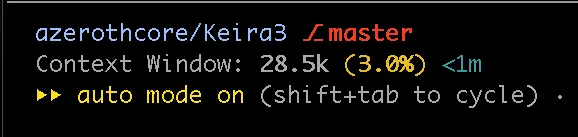
The configuration for it is available here.
Spend tokens where they matter
If you're on a limited subscription, switch models based on the phase (in Claude Code: /model model-name):
- Fetch: a cheap model (e.g. Haiku or Sonnet) is plenty
- Refine and plan: use a smart model (e.g. Fable or Opus); this is where quality is decided
- Execute: a cheaper model (e.g. Sonnet) usually does fine when the plan is good
Don't babysit your agent
Agent sessions can run for a while, and alt-tabbing every minute to check on them kills your focus. ai-notify, a small cross-platform script by Helias, pings you when your agent finishes or needs your input, but only if you're not already looking at that terminal. It works with Claude Code, Codex, OpenCode and more.
Bonus points: you can wire it to play the Warcraft 3 peon's "Work, work" as the notification sound, which feels right at home here.
Going further
Help with PR reviews
Reviewing other people's PRs is one of the best ways to contribute to the project and learn at the same time. This skill can assist you:
/review-code-assistant https://github.com/azerothcore/azerothcore-wotlk/pull/XXXXX
It scans the changes and suggests a list of review comments. DO NOT copy-paste them blindly: read each one, make sure you understand the reasoning behind it, and ask the agent to explain in simpler words whenever you don't. Post only the comments you believe will genuinely help the author improve their code.
This is also an excellent way to deepen your own programming skills, and you can even run it on your own branch before opening a PR.
Keep your local setup healthy
- context-checkup: audit what auto-loads into a session's context and spot what can be trimmed to reduce startup tokens.
- memory-doctor: clean up the memory your agents keep accumulating, moving the relevant parts to the right place. More details about the memory-doctor are available here.
Write new docs and skills, and make your agents learn from their mistakes
- compact-docs-writer: write docs with maximum token economy.
- compact-skill-creator: create or edit skills, keeping them lean and efficient.
- self-improve: whenever your agent makes a mistake, correct it and then run this skill in the same session. The lesson gets stored permanently in the right skill or doc, so the mistake isn't repeated.
The AzerothCore MCP
azerothMCP, created by Blinky, gives your agent read-only access to the AzerothCore databases and wiki documentation. That means it can look up creature scripts, SmartAI logic, DB schemas and game mechanics directly instead of guessing.
Further reading
The workflow and habits on this page are covered in more depth in these write-ups:
- Keep your AI agent's context window sharp: why
/clearand lean contexts matter so much - An approach to agentic skills: the philosophy behind self-improve and continuously teaching your agents
- Context-aware notifications for multi-tasking developers: the story behind ai-notify
- Keep your AI agent’s memory clean and organized with memory-doctor
- The agentic Refine-Plan-Act-Consolidate (RPAC) pattern: explained in theory and in practice
- Use AI to assist you with both sides of code reviews
Wrap-up
AI doesn't replace understanding the codebase; it rewards it. Used with the workflow above, it makes contributing to AzerothCore faster, more fun, and honestly one of the best ways to level up as a developer.
Questions, ideas or feedback? Come talk to us on Discord. This page will keep evolving, and suggestions to improve it are always welcome.
For people who do not speak English
Use this rule to make your agent talk to you in your own language while still generating artefacts in English.
You can just give your AI agent that link, mention your native language, and ask the agent to install it.