 AzerothCore
Introduction to SmartAI
Table of Contents
- Part I: Scripting a Simple Scripted Patrol
- Part II: Event Phases and Links
- Part III: Conditions, Unique AI and Data Set
Part I: Scripting a Simple Scripted Patrol
For this we'll script a simple patrol RP, a script that plays every now and then on a timer and involves a path.
When making blizzlike scripts, most of this data can be gathered in sniffs. Using tools like a parser, WDBE, or WaypointCreator we can extract waypoints, and then script in what actions are to be taken.
In a parsed file, you can search for the unique creature GUID, and see what actions are done. For example, NPCFlag, UnitFlag, StandState, EmoteState and Oneshot Emotes all can be found in the parsed file. Some actions will eventually be hidden, but then we can get creative or even investigate further. In Black Temple, for example, there are creatures that execute an Eat Emote by casting a serverside spell, but that isn't common.
The event we will be implementing contains only StandStates and spoken lines.
First we detail what will happen and when:
UPDATE `creature` SET `MovementType` = 2 WHERE `id1` = 23600 AND `guid` = 18604;

DELETE FROM `creature_addon` WHERE (`guid` IN (18604));
INSERT INTO `creature_addon` (`guid`, `path_id`, `mount`, `bytes1`, `bytes2`, `emote`, `visibilityDistanceType`, `auras`) VALUES
(18604, 186040, 0, 0, 1, 0, 0, NULL);

DELETE FROM `waypoint_data` WHERE `id` = 186040;
INSERT INTO `waypoint_data` (`id`, `point`, `position_x`, `position_y`, `position_z`, `orientation`, `delay`) VALUES
(186040, 1, -4044.12, -3393.59, 38.1363, NULL, 6000), -- 1s, Talk 0, 5s, Talk 1
(186040, 2, -4044.21, -3394.23, 38.3905, NULL, 0),
(186040, 3, -4042.96, -3396.48, 38.3905, NULL, 0),
(186040, 4, -4041.71, -3397.23, 38.3905, NULL, 0),
(186040, 5, -4040.8, -3396.88, 38.1447, NULL, 16000), -- 2s, Emote 16, 6s, Talk 2, 6s, Garion Talk 0
(186040, 6, -4043.67, -3395.27, 38.1634, NULL, 0),
(186040, 7, -4043.67, -3395.27, 38.1634, 3.87463, 240000);
Breaking down this line by line:
UPDATE `creature` SET `MovementType` = 2 WHERE `id1` = 23600 AND `guid` = 18604;
We're not placing a new creature, just adding behaviour to an existing one, so we will just modify its MovementType, which tells it will use the path set in its creature_addon entry.
DELETE FROM `creature_addon` WHERE (`guid` IN (18604));
INSERT INTO `creature_addon` (`guid`, `path_id`, `mount`, `bytes1`, `bytes2`, `emote`, `visibilityDistanceType`, `auras`) VALUES
(18604, 186040, 0, 0, 1, 0, 0, NULL);
This is its creature_addon entry. Patrols have, by convention, ids equal to GUID*10. The most common value for bytes2, also known as SheateState, is 1, which represents the melee weapons of the creature. This also contains RP-related items such as lanterns, bottles and such.
DELETE FROM `waypoint_data` WHERE `id` = 186040;
INSERT INTO `waypoint_data` (`id`, `point`, `position_x`, `position_y`, `position_z`, `orientation`, `delay`) VALUES
(186040, 1, -4044.12, -3393.59, 38.1363, NULL, 6000), -- 1s, Talk 0, 5s, Talk 1
(186040, 2, -4044.21, -3394.23, 38.3905, NULL, 0),
(186040, 3, -4042.96, -3396.48, 38.3905, NULL, 0),
(186040, 4, -4041.71, -3397.23, 38.3905, NULL, 0),
(186040, 5, -4040.8, -3396.88, 38.1447, NULL, 16000), -- 2s, Emote 16, 6s, Talk 2, 6s, Garion Talk 0
(186040, 6, -4043.67, -3395.27, 38.1634, NULL, 0),
(186040, 7, -4043.67, -3395.27, 38.1634, 3.87463, 180000);
This is the waypoint patrol the creature is assigned to. I've shortened it to not contain columns we'll not use.
The x,y,z values are self-explanatory. An orientation change requires an extra point copied from the one before, otherwise it's null. Delay will dictate the wait time after that waypoint is reached, as such, after the creature finishes the path on point 7, it will wait 3 minutes before starting the patrol again.
I also added a few comments detailing what actions are taken on which waypoints. It's a simplified version of what we'll be writing in the Actionlist.
I use Keira to edit SmartAI, so that's what we'll use in this tutorial.
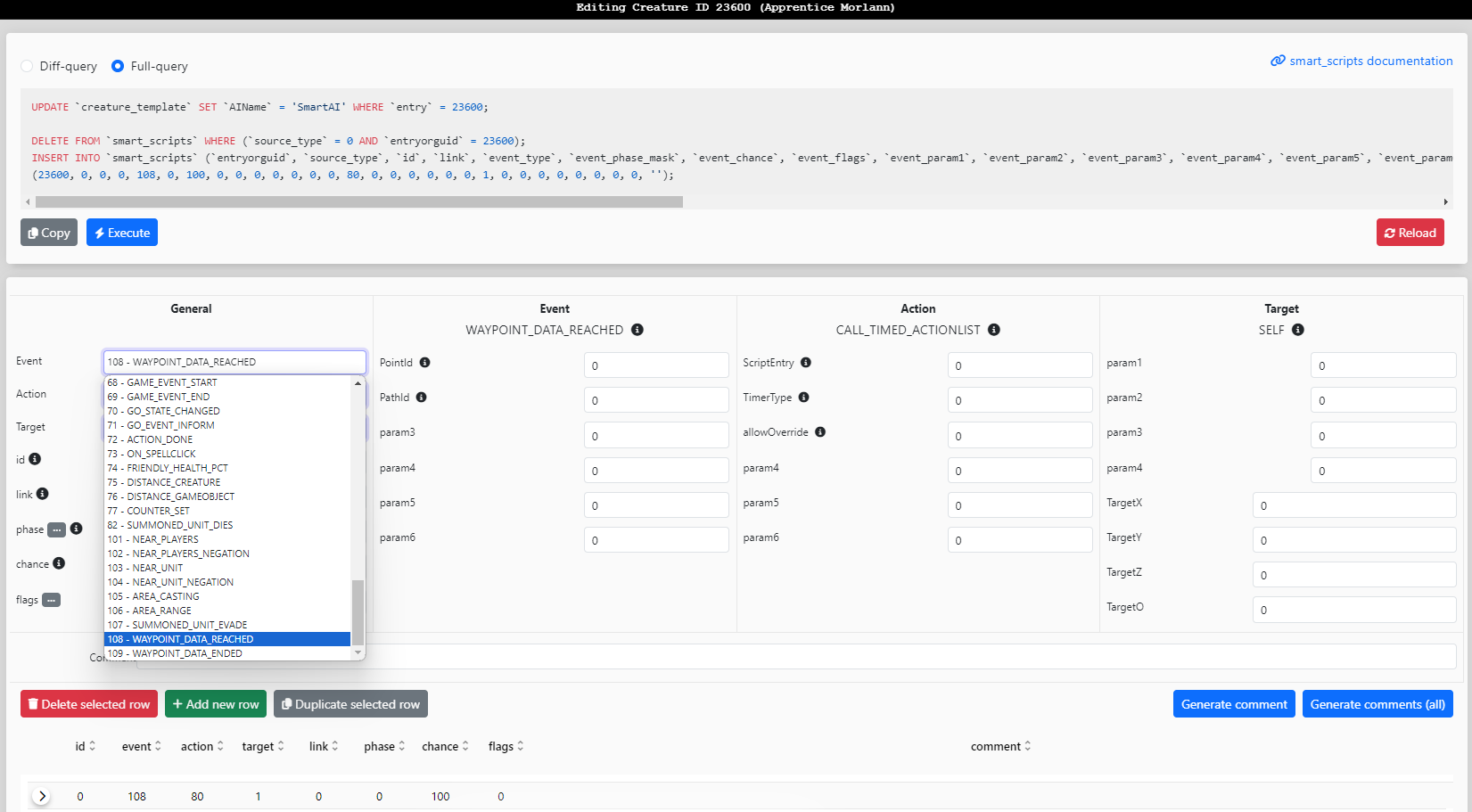
Since we're using patrols, we'll use a, event called WAYPOINT_REACHED. We could also use MOVEMENTINFORM, especially useful when we're dealing with single points rather than full paths.
Keira will then generate an output we will copy and paste.
UPDATE `creature_template` SET `AIName` = 'SmartAI' WHERE `entry` = 23600;
DELETE FROM `smart_scripts` WHERE (`source_type` = 0 AND `entryorguid` = 23600);
INSERT INTO `smart_scripts` (`entryorguid`, `source_type`, `id`, `link`, `event_type`, `event_phase_mask`, `event_chance`, `event_flags`, `event_param1`, `event_param2`, `event_param3`, `event_param4`, `event_param5`, `event_param6`, `action_type`, `action_param1`, `action_param2`, `action_param3`, `action_param4`, `action_param5`, `action_param6`, `target_type`, `target_param1`, `target_param2`, `target_param3`, `target_param4`, `target_x`, `target_y`, `target_z`, `target_o`, `comment`) VALUES
(23600, 0, 0, 0, 108, 0, 100, 0, 1, 0, 0, 0, 0, 0, 80, 2360000, 0, 0, 0, 0, 0, 1, 0, 0, 0, 0, 0, 0, 0, 0, 'Apprentice Morlann - On Point 1 of Path Any Reached - Run Script'),
(23600, 0, 1, 0, 108, 0, 100, 0, 5, 0, 0, 0, 0, 0, 80, 2360001, 0, 0, 0, 0, 0, 1, 0, 0, 0, 0, 0, 0, 0, 0, 'Apprentice Morlann - On Point 5 of Path Any Reached - Run Script');
This seems simpler than what I described in the comments. This is because we don't actually take the actions here. We'll use a different mechanic of SmartAI, called Actionlists, or Script9, which is a sequence of actions taken on timers provided. Thus we can make delayed actions much easier. Script IDs for Actionlists are, by convention, numbered CreatureEntry*100, adding +1 to every unique list. Since we'll use 2 different sets of actions, we use the IDs 2360000 and 2360001.
In the event parameters, we leave the pathId parameter as 0, because we don't expect any patrols other than the one we added, so if we didn't leave it as 0 it'd be a trivial check that would always return true anyways, so we'll ignore it.
For the target parameters we'll leave it as 1, since the action to call Actionlists doesn't take any targets other than self.
Now we'll open the Actionlist Editor and make both Scripts.
DELETE FROM `smart_scripts` WHERE (`source_type` = 9 AND `entryorguid` IN (2360000, 2360001));
INSERT INTO `smart_scripts` (`entryorguid`, `source_type`, `id`, `link`, `event_type`, `event_phase_mask`, `event_chance`, `event_flags`, `event_param1`, `event_param2`, `event_param3`, `event_param4`, `event_param5`, `event_param6`, `action_type`, `action_param1`, `action_param2`, `action_param3`, `action_param4`, `action_param5`, `action_param6`, `target_type`, `target_param1`, `target_param2`, `target_param3`, `target_param4`, `target_x`, `target_y`, `target_z`, `target_o`, `comment`) VALUES
(2360000, 9, 0, 0, 0, 0, 100, 0, 1000, 1000, 0, 0, 0, 0, 1, 0, 0, 0, 0, 0, 0, 1, 0, 0, 0, 0, 0, 0, 0, 0, 'Apprentice Morlann - Actionlist - Say Line 0'),
(2360000, 9, 1, 0, 0, 0, 100, 0, 5000, 5000, 0, 0, 0, 0, 1, 1, 0, 0, 0, 0, 0, 1, 0, 0, 0, 0, 0, 0, 0, 0, 'Apprentice Morlann - Actionlist - Say Line 1'),

(2360001, 9, 0, 0, 0, 0, 100, 0, 2000, 2000, 0, 0, 0, 0, 5, 16, 0, 0, 0, 0, 0, 1, 0, 0, 0, 0, 0, 0, 0, 0, 'Apprentice Morlann - Actionlist - Play Emote 16'),
(2360001, 9, 1, 0, 0, 0, 100, 0, 6000, 6000, 0, 0, 0, 0, 1, 2, 0, 0, 0, 0, 0, 1, 0, 0, 0, 0, 0, 0, 0, 0, 'Apprentice Morlann - Actionlist - Say Line 2'),
(2360001, 9, 2, 0, 0, 0, 100, 0, 6000, 6000, 0, 0, 0, 0, 1, 0, 0, 0, 0, 0, 0, 19, 23601, 0, 0, 0, 0, 0, 0, 0, 'Apprentice Morlann - Actionlist - Say Line 0 (Apprentice Garion)');
Now here is the meat of the script. The first script is simple, with only talk actions taken.
The second script plays an emote, makes Morlann, our creature, talk, then makes a different creature talk. When we use a target for the TALK action, and leave the third parameter as 0, we can remotely make the targeted creature(s) talk without making a more complex or burdensome script. The third parameter, when set to 1 and with a valid target, will for example address the target by its name or class, such as calling the player by name.
So this is what will happen:
- The creature spawns and starts the patrol for the first time
- When a point is reached, it'll fire the Event, checks if the point reached is 1 or 5, if so, the actions is played
- The action is taken and the creature is assigned an Actionlist, which will play a sequence of delayed actions
- Once the patrol is finished, it'll wait 3 minutes and then restart
Part II: Event Phases and Links
Most enemy creatures are fairly simple, following one or two timers and casting a couple of spells, which is easy enough to do in a few minutes. The power of SmartAI does not come from following simple spell timers. To illustrate an example, we're going to look at the script of some Outland creatures that I find quite interesting. In Outland there are several Void creatures, of which the casters have a particular script structure that's shared between them.
At first, they only cast Shadow Bolt and have no special resistances. However once the player hits them with, for example, a Frostbolt, they'll cast a Damage Reduction: Frost spell on themselves, will say a line, then start casting Frostbolt right back at the player. So how do we implement that in SmartAI?
A ready example we can use is the Voidshrieker.
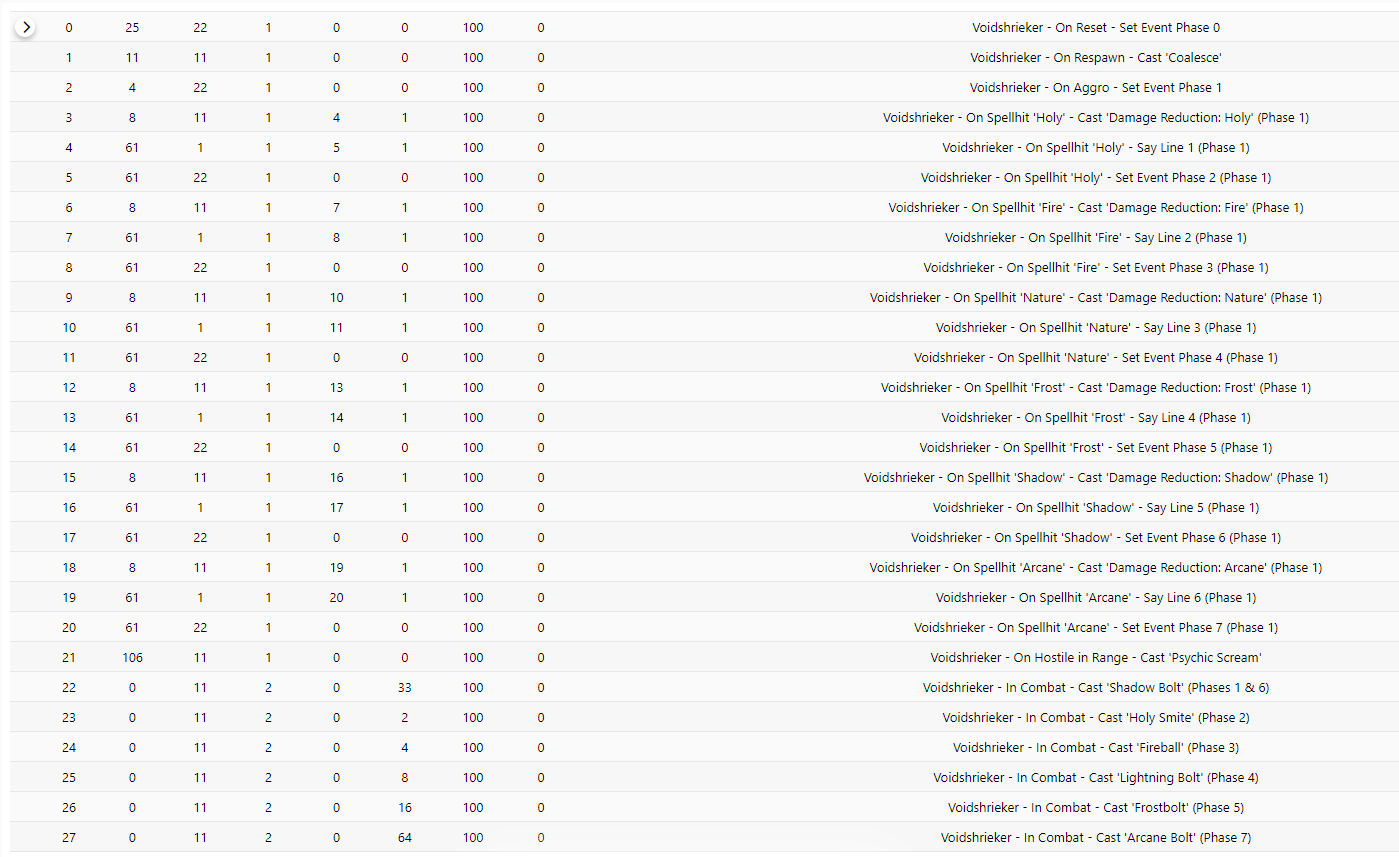
Unreadable, right? But I'll try and make it easier to parse.But first we need to understand how Event Phases work.
Simply put, phases allows us in one way to dictate what type of events can be played, as every event is assigned a phase. Phase 0 is the overarching phase. Anything placed in Phase 0 is played, regardless of which phase the creature is currently in.
Setting up the creature's Event Phase is an action, and it resets when the creature evades, dies or respawns, so it's good to reset the Event Phase to what we want as well.
Check id 2 of the script. On Aggro the Event Phase will be set to 1, so what events belong to the Event Phase 1 set? In short, all of rows 3 through 18, a large chunk of the script.
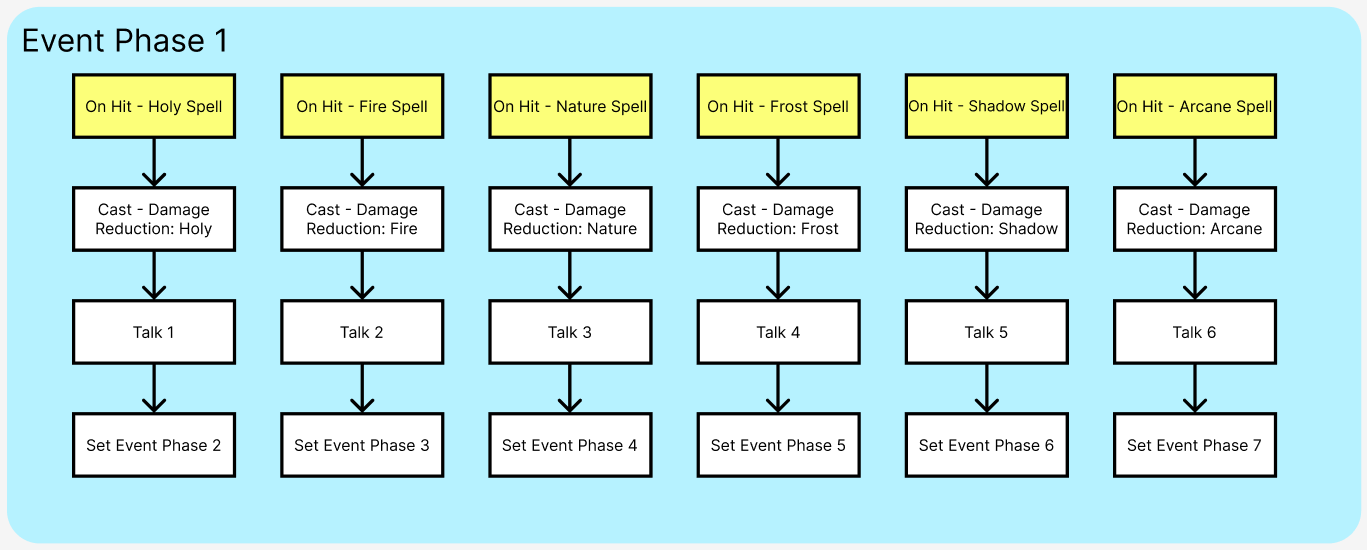
These ones. After the Voidshrieker is hit by a spell of the schools above, it will play a sequence of actions, linked together with EVENT_LINK, then it will change its own phase. Notice that Event Phase 1 is only set On Aggro, so this behaviour can only be played ONCE per combat. If I hit it with a fire spell, the Event will play and change phase, so if I hit it again with a frost spell instead, it won't cast Damage Reduction: Frost because it's not in Phase 1, it's now in Phase 3.
Futhermore, while not shown in this example, Event Phases are a mask, not a enum value. Meaning that we can layer event phases on top of each other. If we wanted, we could make the Voidshrieker stack resistances and be able to cast the full elemental gradient of spells by accumulating event phases rather than replacing them.
P.S.: Event Flag 1 (No Repeat) resets once combat is over! To never reset and make sure the creature never EVER plays the Event again, use flag 256 (Don't Reset)!
With these events in hand we'll use them to make the creature cast different spells depending on which Phase it's in.
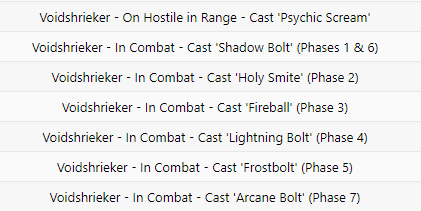
All of these Events above are tied to timers, not triggers like On Spellhit. See Cast 'Shadow Bolt? That one is tied to two Event Phases, like in the Venn Diagram example I mentioned. If the player does not cast a spell, or is a warrior, for example, the Voidshrieker will cast Shadow Bolt by default, as well as casting it if the player did cast a Shadow Spell. And Psychic Scream? That one is tied to Event Phase 0, which means that no matter the Phase the creature is currently in, it'll run the timer and execute the event.
Going back to the flowchart I didn't yet explain properly how these actions are linked to each other. In Part 1 I introduced the concept of Actionlists. This is similar.
Links allows us to play several actions in order instantenously, so it'll not allow us to make delays. To work with it, you need to set the id of the Event that will be linked in the link field.
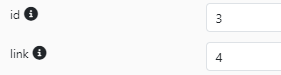
As you can see, Event 3 links to Event 4, so when Event 3 is executed, Event 4 will automatically be executed as well. The event that is linked needs to be, necessarily, Event type 61, EVENT_LINK.
Multiple Events can link to the same event. For example, if a creature says the same line after casting several different spells, all the spells can be linked to the same Talk Action.
If we make too many links, they make it harder to maintain the script, since changing one row might require changing all of them. For more than one link in a series, I oftentimes like to use Timed Actionlists instead, using TimerType 2 to make sure it plays in combat as well. This makes it easier to encapsulate mini-scripts within the main creature script, without making spaghetti links.
Part III: Conditions, Unique AI and Data Set
In Shattered Halls, there is a creature called the Shattered Hand Legionnaire.
Well, there's actually 8 of them. And they. all. have. different. AI.
The combat mechanics and spells they use are common between them. They all Enrage, they all Pummel casters, and they all cast Aura of Discipline.

But let's see, for example, the AI of GUID 151010, for that we check its guid-specific entry. Go to the SmartAI panel and search by entity like below.
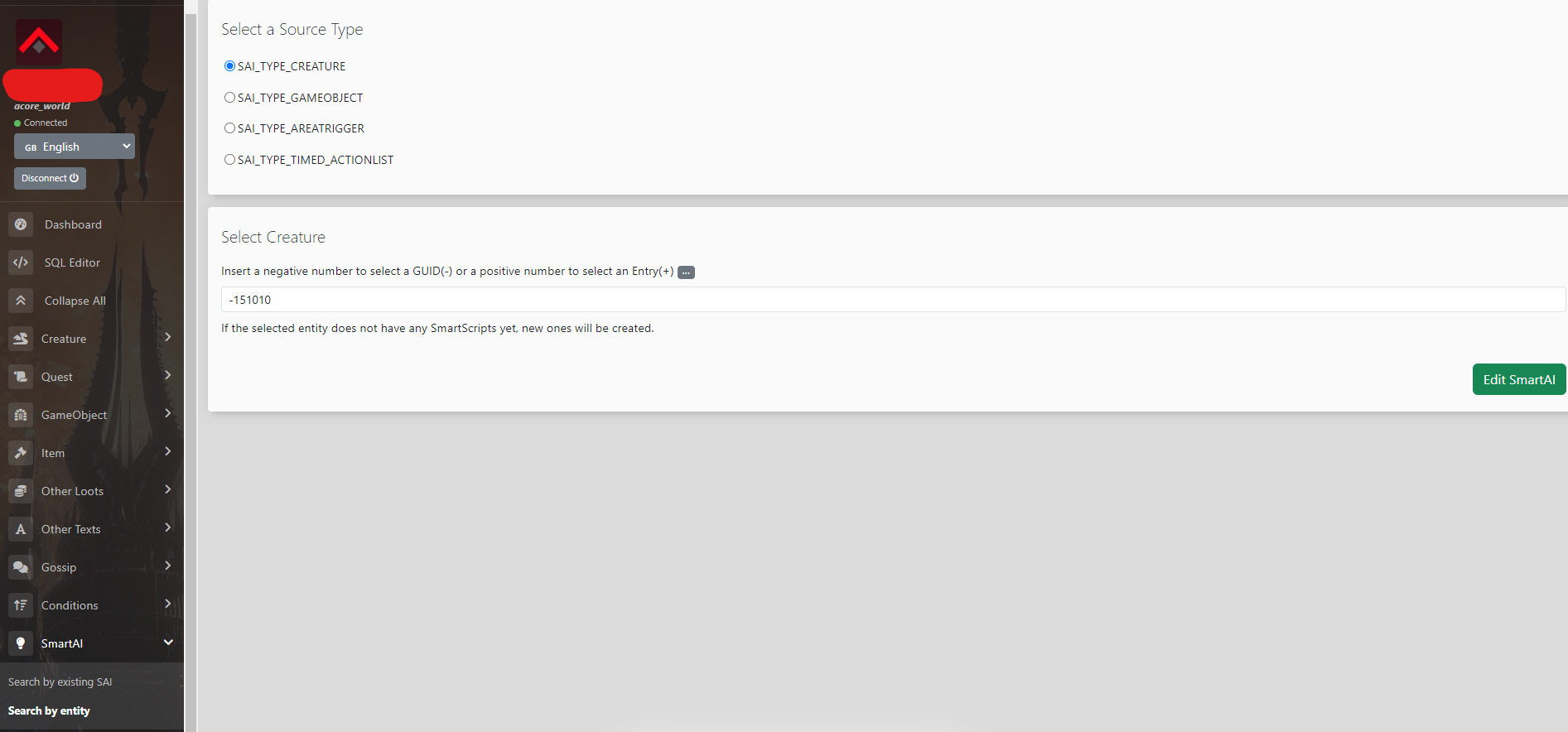
You'll see several rows, all with ids numbered >1000, and with behaviour that is unique to this specific GUID
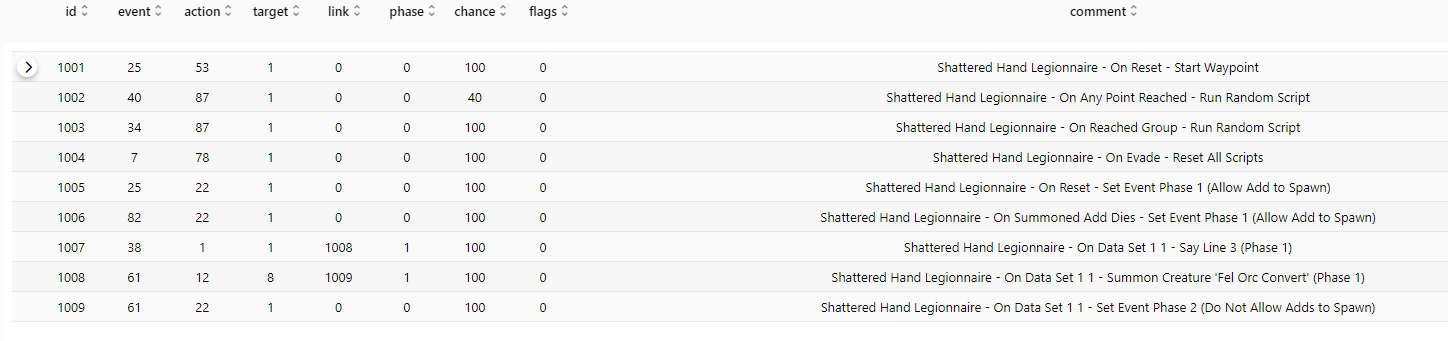
Lines 1001 to 1004 are RP scripts. Focus on the ones below. For example, on the general script in the first image, we see that once the creature receives DATA SET -- an action that allows us to communicate between creatures -- it'll Enrage. Every other creature in this dungeon, once they die, has a script to SET DATA on the nearest Legionnaire, so that they all Enrage. But if you include this guid-specific script, this particular Legionnaire will not only Enrage, they'll also say a special line and Summon a creature in an unique position. We then use Event Phases to allow only one creature to spawn at a time.
Now, the important part is that usually these guid-specific scripts override the creature's normal script, making it so we have to copy over, creating a lot of bloat. But around the time we were rewriting Shattered Halls, a friend of mine added an extra flag to creatures, which will make them load both their general SmartAI tied to its entry, as well as the SmartAI tied to its guid.
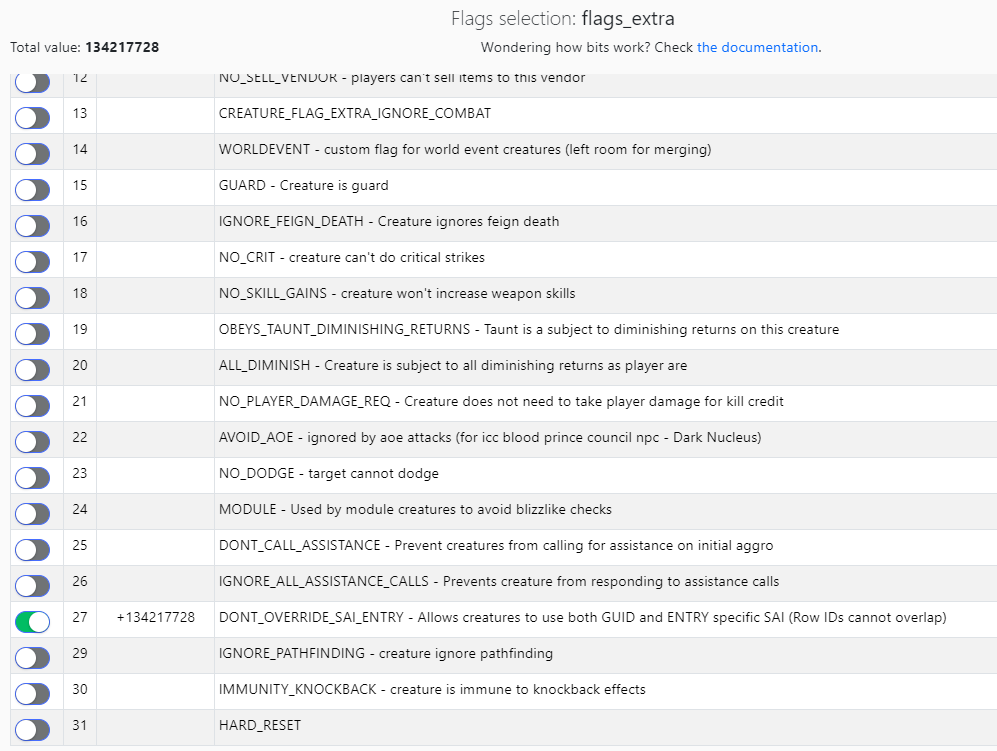
This is extremely important, as A LOT of creatures have unique behaviours, so to avoid enormous amounts of useless rows, we use this flag. Be aware that we use ids 1000+ when making guid-specific SAI in these cases, because row ids should not overlap!
Now. Let's look at these summons. How do they work? Well, it just so happens that each one also has unique behaviour! Because several legionnaires spawn them at different positions. And each can do a different thing.
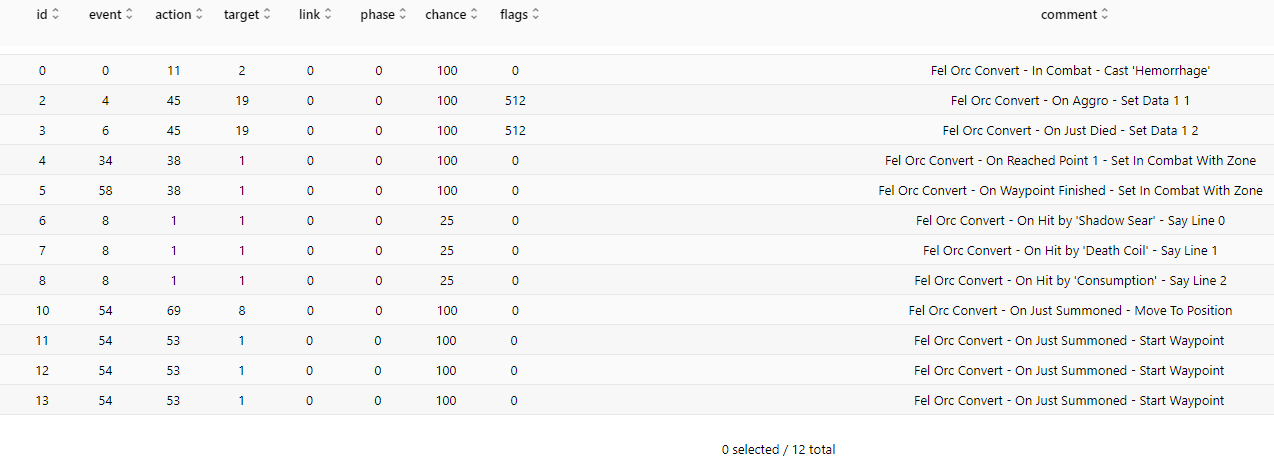
The issue is that summons have no guid that we could create a guid-specific script for.
The script above is for the summons, notice that when they are On Summoned, they execute several different scripts. Won't they overlap? They should, yes. But in this case they don't, because we use conditions.
Conditions are very powerful tools, and we can tie them directly to SmartAI, for each and any row.
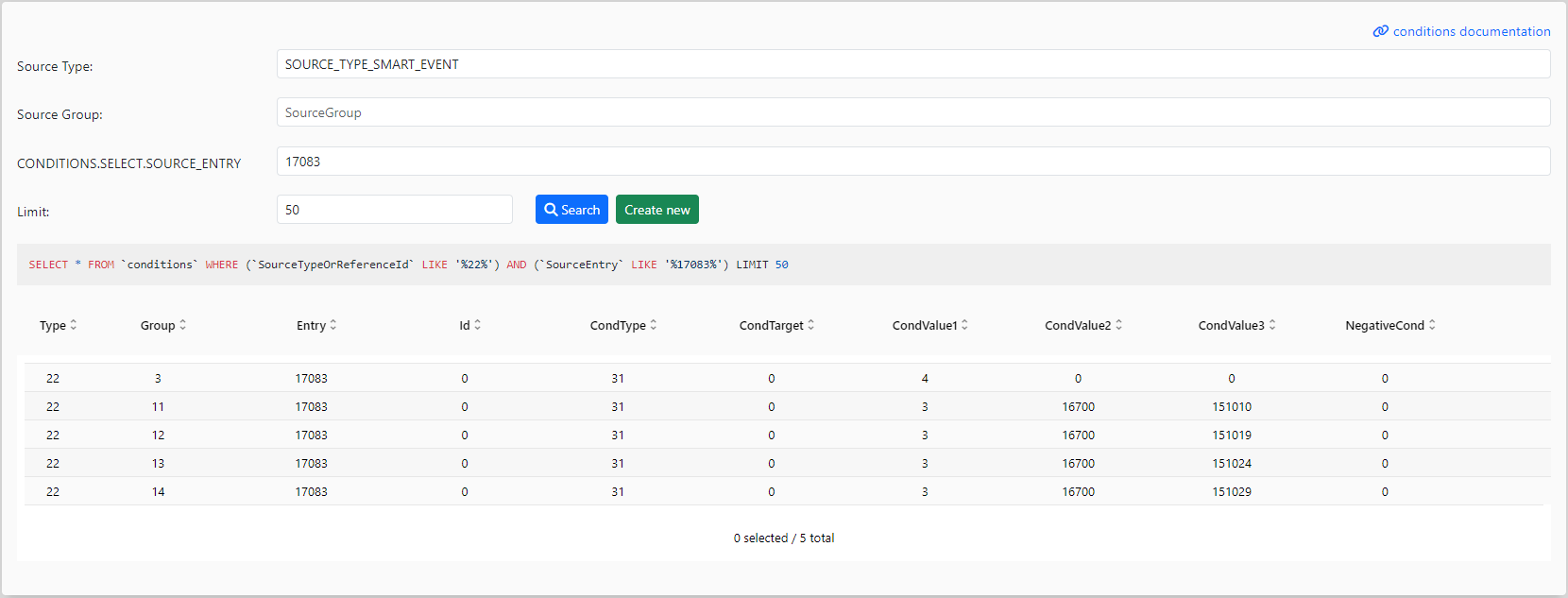
See where ConditionValue is 151010? That means that in SmartAI id 10 (11 - 1), that event will only play when the Invoker (in this case, the summoner) is the Legionnaire of GUID 151010.
You should start seeing how much more powerful SmartAI can be now. Every single row can be conditioned. Another interesting case study is a quest object which detects how far the player has progressed so that it can perform lines and spawn creatures. In it, every time the player interacts the script is called, but it only goes through when conditions are met.
Invokers are something that not all Events have. When using event OOC_LOS, which checks for a player entering the Line of Sight of our creature, the Invoker is the player that entered the Line of Sight, for example. When you Summon Creature, the Invoker is the summoner. Invokers can be used as a target_type as well. When the Event On Quest Accepted is executed, for example, it might be good to use Action 64 (STORE_TARGET_LIST) to save the Invoker or even the Invoker's whole party with target_type 16.
You might question why guid-specific SAI is needed then if we could use conditions? It's because we'd to check every time the event is triggered. That might be okay for one or two creatures with guid-specific AI, but in Shadow Labyrinth, you have dozens. You'd have dozens to even a hundred checks every few seconds.